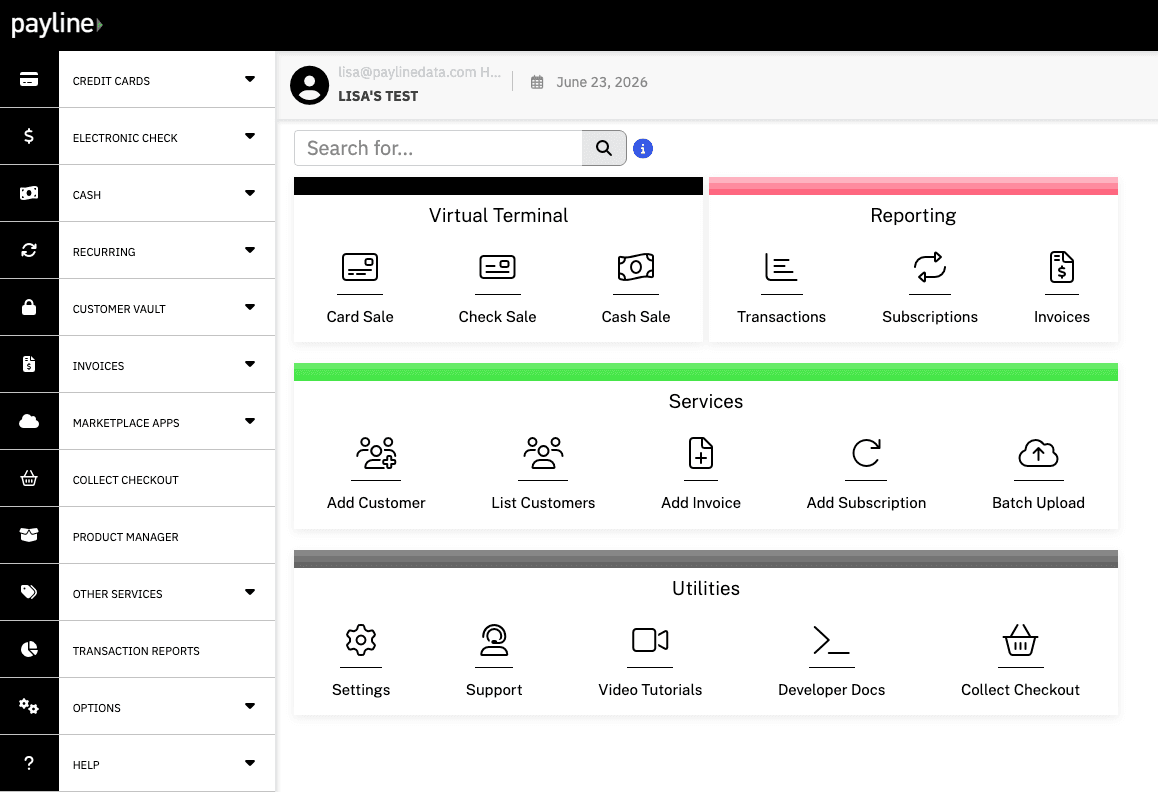

Virtual terminal
The browser interface your staff use to enter authorized phone or remote payments. Your team controls payment entry through approved account access.
The browser interface your staff use to enter authorized phone or remote payments. Your team controls payment entry through approved account access.

The technology connecting checkout or another payment interface to processing services. It transmits authorization requests and returns the response.
They often work together. The virtual terminal is the entry screen; the gateway connects it to processing. Both need an approved, compatible merchant account.
Simplified authorization flow. Authorization and the later settlement and funding process are different stages.
The customer or authorized staff member starts the payment.
Transaction information moves through the processing services.
The interface receives the result of the authorization request.
Choose who enters the payment and how it connects to the order. Features depend on your gateway, processor and configuration.
Take authorized phone payments through a staff-facing browser interface. Confirm the approved entry method and account permissions.
Connect an online checkout or supported payment application. Hosted checkout lets customers enter their own details.

Send customers to a supported payment page for an invoice or one-off request. Customers do not need a staff login.

Support repeat billing where your account and tools permit it. Confirm customer authorization, scheduling and cancellation requirements.
Connect the payment to the order, customer and team responsible for it.
Take an authorized order by phone, confirm the amount and send a clear receipt.
Collect supported deposits or final balances, with documented service and refund terms.
Match payments to invoice references and confirm transaction limits and reconciliation requirements.
Connect supported payment flows to your application. Explore Payline Connect and confirm compatibility before building.

Confirm the order, amount and authorization. Use approved channels for payment details, provide a receipt and check transaction status before retrying an unclear response.

Confirm compatible gateway and processor combinations, reporting, user permissions and supported tokenization. Your business retains security and PCI responsibilities.

Agree eligibility, fees, funding, access and support responsibilities. Test payments, receipts, refunds and reconciliation through the provider’s approved process.
Gateway technology does not establish merchant approval. Review the merchant account and processing relationship together. For software payment integrations, confirm supported combinations, testing and operational responsibilities in the gateway integration documentation.
“It is user-friendly. Payline deposits in our bank account is an advantage. The additional security codes provide a layer of protection.”
“Payline helps our accounting team balance financial reports by managing financial transactions such as payments and refunds. Essentially, it's a straightforward method to manage all of our purchases and sales within a single app.”
Phone payments entered manually into a virtual terminal are generally card-not-present: the card is not read at a physical checkout. Confirm the approved entry method, applicable pricing and fraud checks with your provider.
No. Your devices, access controls, staff procedures and handling of payment information also matter. Ask which PCI validation applies. Keep payment data out of ordinary email, chat, spreadsheets and call recordings unless an approved compliant process addresses it. Never retain card verification codes after authorization; see PCI SSC guidance.
Ask about individual user accounts and permissions for payments, refunds and reports instead of sharing a login. Available controls depend on the solution. An authorization response is not settlement or a guarantee against a dispute.
Not necessarily. Match payments to invoice or order references and confirm supported accounting fields, transaction limits and reconciliation integrations. A payment tool does not automatically synchronize every invoicing system.
It is a browser-based tool for entering and managing supported payments. Businesses commonly use it for authorized phone or other remote transactions.
They are different parts of the payment setup. The virtual terminal is the interface your team uses; gateway technology connects payment interfaces to processing services.
Manually entered virtual-terminal transactions do not require a physical reader. You need an approved account, supported browser, internet connection and a suitably secured device. Confirm supported devices with the provider. Any optional reader or other hardware must be compatible with the selected product.
Some solutions include or connect with recurring-payment tools. Confirm availability, authorization requirements and billing controls for your setup.
A virtual terminal is generally a staff-facing interface. Use an appropriate hosted checkout or payment-link experience when customers need to enter their own payment information.
Timing depends on account approval, access and configuration. Confirm your setup requirements before relying on a launch date.
It connects a checkout or payment interface to processing services for authorization and returns the transaction response. It does not replace the merchant’s processing relationship.
Online payment services generally include gateway or equivalent connection technology. It may be bundled into your chosen platform rather than sold as a separate product.
No. They perform different roles in the payment flow, although one provider may offer both services together.
Some gateway solutions support recurring-payment tools or integrations. Confirm scheduling, stored-payment and account requirements for the actual offering.
A virtual terminal is useful for staff-entered payments. It commonly uses gateway services behind the scenes and does not provide the same customer experience as a website checkout.
Payline’s integration offerings include API-based approaches. The available endpoints, supported providers and access requirements depend on the solution; review the appropriate documentation with the team before designing your integration.